Sending the patient a link to the online Registration/Admission form
You can choose to send a link to an online form that is uniquely constructed so that it is received and completed by a specific patient, or you can just provide a generic link and match it to a patient when you import it.
From a privacy and accuracy point-of-view it would be better to include the patient identifier (which is obfuscated text) as you know that the person completing the form is the intended recipient.
If you are sending a link to a new patient that has not yet been added to the database, you will need to send the generic URL, without a patient ID.
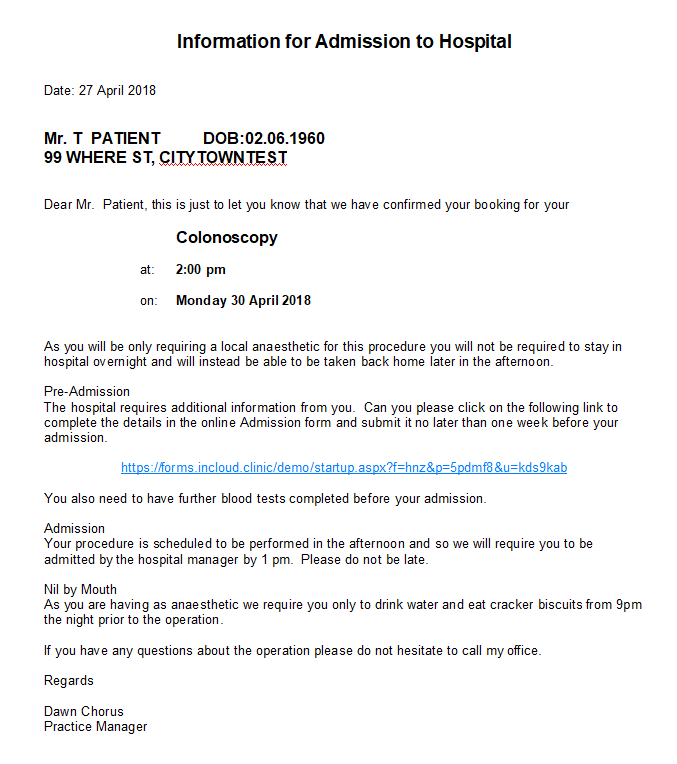
- Go to Setup > Templates > Forms > Form Letters and create of edit a form letter that advises the patient of their future booking.
Please send a request to help@incisivesupport.com if you would like assistance to construct a form letter which includes the patient's next appointment or admission details.
- Within the form letter, insert the following web address (URL) to send a link to the online Admission form.
https://forms.incloud.clinic/rodneysurg/startup.aspx?f=hnz&q=preadmit&p=<patienturi> The above URL is only to be used when you are sending the patient an email from the Private Hospital Manager (PHM) application. This is because it needs to generate and include a unique URI for the patient. If you just want to send a URL link which isn't linked to a specific patient (you can still match the patient when you import the form data) then you can use the following: *https://forms.incloud.clinic/rodneysurg/startup.aspx?f=hnz&q=preadmit*
To send a link for the Procedure form use the following URL: https://forms.incloud.clinic/rodneysurg/hosproc_nz.aspx ?questions=~/History/preadmit.csv
To send a link for a Registration form use either of the following URLs:
*https://forms.incloud.clinic/rodneysurg/startup.aspx* (doesn't include the patient ID)
https://forms.incloud.clinic/rodneysurg/startup.aspx?p=<patienturi> (does include patient ID)
- Use the following menu options to create and send the form letter to the patient from either: Appointment module – Daylist > Print > Form letter then 'Send & OK' to send the email
Patient module – Select patient then Forms > New then 'Send & OK' to send the email
- When the form has been submitted by the patient you will receive a notification email and can then import the form data from Utilities > Import > Patient (XML) If you have included the Patient URI in the web link then it will automatically match the form with the patient and will take you to the Verify screen.
If you haven't used the Patient URI you may be required to match the patient if there is insufficient information for the program to make an accurate match.
Always import the Admission forms to the 'Rodney Surgical Centre'
- To print a copy of the Admission form data, go to the patient's Notes, find the record titled 'Hospital Admission' (or similar) and use the hyperlink that is below 'All form data' to display the form in a pdf format and print the pages you require.
The pdf form includes all the data that the patient has entered in the online form.
Sending the patient a Feedback (survey) form
To make the feedback form as easy and fast as possible to complete, they do not require a patient to include their name or other details. However we can include the patient ID in the web address that is sent to them so that their feedback can be linked to their record when it is imported back into the database.
- Create a form letter and include the following URL:
- With a patient ID https://forms.incloud.clinic/rodneysurg/startup.aspx?f=f&p=<patienturi>
- Without a patient ID *https://forms.incloud.clinic/rodneysurg/startup.aspx?f=f*
- Import the form data from Utilities > Import > Patient (XML)
If you have not included the patient ID in the URL, when the feedback form is imported it is effectively anonymous and will not be linked to a known patient. Instead, the reply will be linked to a 'dummy' patient called UNKNOWN
If you wish to modify the questions and answers in the feedback survey please contact us so that we can provide you with the tools to modify your survey.
Example of Admission information form letter