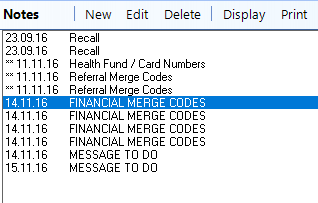
'Tagging' an item is another term for selecting one (or more) item from many to give them a special treatment such as printing, sending, saving etc.
The functions that provide an option to 'Tag' are found in:
- Patient > Notes
- Patient > Letters
- Patient > Financial
- Patient > Images
To tag items
- Highlight the item to tag.
- Press F6 to tag the item.
- Continue to tag additional items as required.
- Either Print or Send the tagged items.
- On the Notes tab there is a 'Tag' icon at the bottom of the screen that can be used as an mouse alternative to F6.

- F6 (or Tag) will toggle the tag on the highlighted item on and off.
Tagged Notes (Tree View)
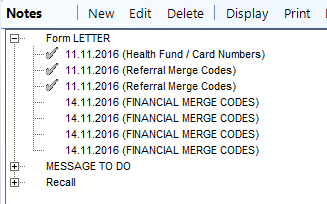
Tagged Notes (List View)