If your practice has physical patient files, and either the Patient database counter, or the Referral number is not an appropriate filing number, an Alternate Patient ID can be adopted.
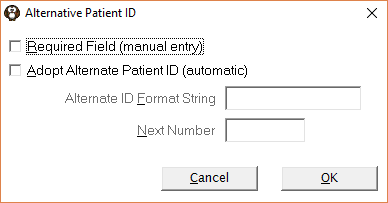
Either | Required Field (manual entry) |
| If this option is checked on, when entering a new patient (via Patient Mode) you will be required to (manually) enter an Alternate Patient ID. |
Or | Adopt Alternate Patient ID (automatic) |
| If this option is checked on, then the next available number will automatically be assigned to the patient when either:
|
|
| Alternate ID Format String | This section is only available if the Adopt Alternate Patient ID option is checked on. Enter the format string required for the Alternate ID, i.e. if a 5 character number is required enter #####. Some practices prefix the number with the year, i.e 16/#####. If this is the case, the year needs to be manually advanced at the start of a new year. If the number of digits required for the Alternate ID exceeds the Format String entered, you will need to increase the number of #'s. i.e. if you have the format string set at #### and your last Alternate ID was 9999, then before number 10,000 can be allocated, the format string would need to be manually changed to #####. |
|
| Next Number | This section is only available if the Adopt Alternate Patient ID ID option is checked on. Manually enter the next starting number. |